Visual Interface
Mavi has a visual interface (built entirely with Makie) whose purpose is to serve as a visual debugging tool for the system being explored. The UI structure essentially has two main elements:
- A plot where the system's particles are rendered in real time.
- A panel showing some information and buttons to control the animation.
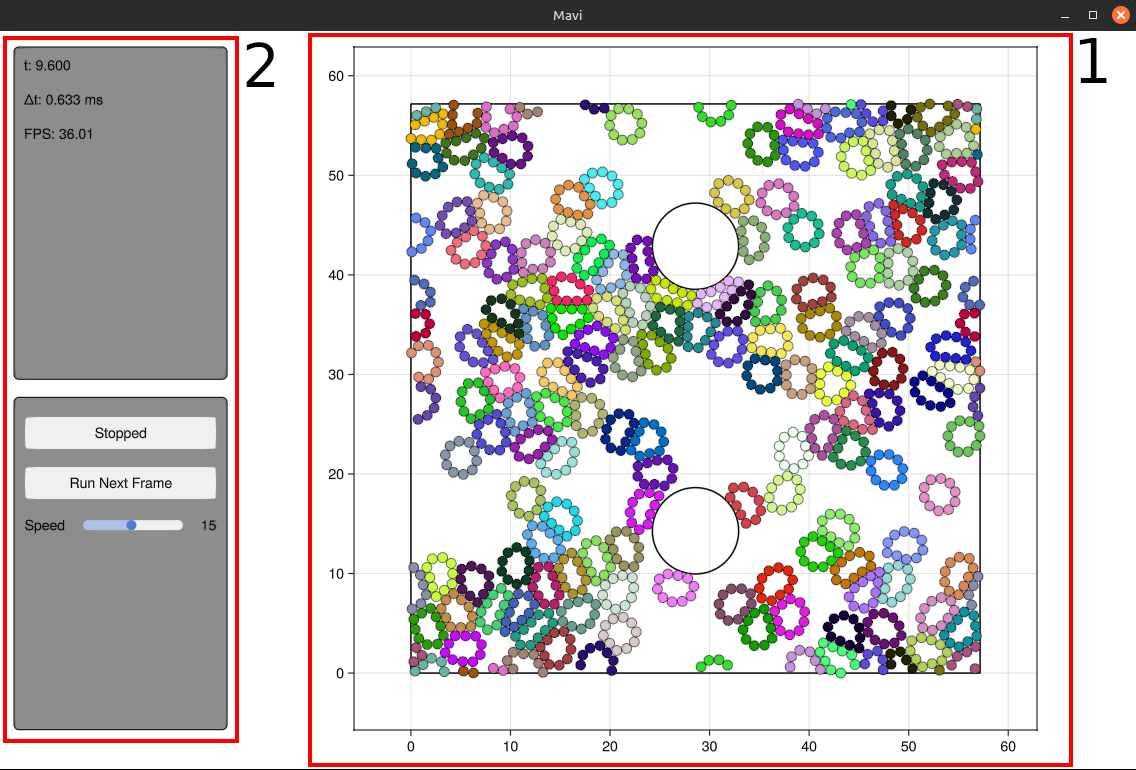
Animating the system
To animate a system, simply call the function animate inside the module Mavi.Visualization
using Mavi.Visualization

# Creating the system
system = ...

animate(system)
and if you have a custom step function called my_step!
using Mavi.Visualization

# Creating the system
system = ...

animate(system, step_func=my_step!)
It is possible to configure aspects of the animation by passing an instance of AnimationCfg to animate. The following example animates the system with the FPS set to 30, executing 15 time steps per animation frame:
using Mavi.Visualization

# Creating the system
system = ...

anim_cfg = AnimationCfg(
    fps=30,
    num_steps_per_frame=15,
)

animate(system, anim_cfg)
Extending the Information Panel
It is possible to inject custom information into the information panel. This is done by setting the custom_items field of DefaultInfoUICfg, which in turn is a field of AnimationCfg. custom_items is a function that should return the additional information to be displayed in the information panel. For more details about its signature, see the documentation in info_ui.jl.
The following example uses a system already defined in Mavi.jl and adds the position of the first particle to the information panel.
# Creating a System
system = System(
    state = SecondLawState(
        pos=[[1 2 3]; [1 2 3]],
        vel=[[1 1 0]; [-1 0 2]],
    ),
    space_cfg=SpaceCfg(
        wall_type=RigidWalls(),
        geometry_cfg=RectangleCfg(length=4, height=4),
    ),
    dynamic_cfg=LenJonesCfg(sigma=1, epsilon=0.1),
    int_cfg=IntCfg(dt=0.01),
)

# Function used to show particle position
# in the information panel
function get_pos(system, _)
    pos = system.state.pos[1]
    pos_formatted = @sprintf("(%.3f, %.3f)", pos[1], pos[2])
    return [("pos[1]", pos_formatted)]
end

anim_cfg = AnimationCfg(
    info_cfg=DefaultInfoUICfg(
        custom_items=get_pos
    ),
    graph_cfg=MainGraphCfg((
        CircleGraphCfg(), # Render particles as circles
        NumsGraphCfg(), # Show particle indices
    ))
)

animate(system, anim_cfg)